Elements & styles
Explore the DOM and edit CSS on the connected page.
Bring real devices, Chrome DevTools and your coding agent into one workspace. Inspect the page, understand the failure, verify the fix.
macOS 15+ · iOS & Android · Version 1.0 in development
$ tapscope targets list --json
{
  "ok": true,
  "command": "targets list",
  "data": {
    "targets": [{
      "id": "sample-page",
      "title": "Trail Notes",
      "type": "page"
    }]
  }
}Your next afternoon outside.
Illustrative preview · sample data, not a live device session
ONE LOCAL CONNECTION
Tapscope translates WebKit into CDP and passes native CDP targets through. Choose the interface that fits your work.
Coding agentsClaude Code · Codex · Cursor
MCPTerminal & scriptsCLI commands with JSON output
CLIDesktop appChrome DevTools in your workspace
APPCDP clientsPuppeteer · MCP · VS Code
CDPFOR CODING AGENTS
Let your agent read a DOM snapshot, inspect errors and requests, then reload and capture the result. Structured JSON keeps scripts predictable.
$ tapscope snapshot --interactive --json
{
  "ok": true,
  "command": "snapshot",
  "data": {
    "nodes": [
      {"ref": "@e1", "role": "heading", "name": "Trail Notes"},
      {"ref": "@e2", "role": "button", "name": "View route"}
    ]
  }
}$ tapscope console list --types error,exception --json
{
"ok": true,
"command": "console list",
"data": {
"events": [{"eventId": 12, "type": "error",
"message": "Route data could not be loaded"}]
}
}$ tapscope network list --failed --json
{
"ok": true,
"command": "network list",
"data": {
"events": [{"eventId": 13, "url": "/api/routes",
"failed": true, "status": 503}]
}
}Example CLI output; references are valid until the next snapshot in the session.
The local endpoint at 127.0.0.1:9222 connects Chrome DevTools MCP, Puppeteer and VS Code to the selected device.
{
  "mcpServers": {
    "tapscope": {
      "command": "npx",
      "args": [
        "chrome-devtools-mcp@latest",
        "--browser-url=http://127.0.0.1:9222"
      ]
    }
  }
}Use tapscope agent-context for the installed command reference, or tapscope skills get mobile-debugging for workflow guidance.
tapscope agent-context
tapscope skills get mobile-debugging
THE DESKTOP WORKSPACE
Find your device in the sidebar, choose a page and open Chrome DevTools. Keep multiple targets in native window tabs.
Get the Mac app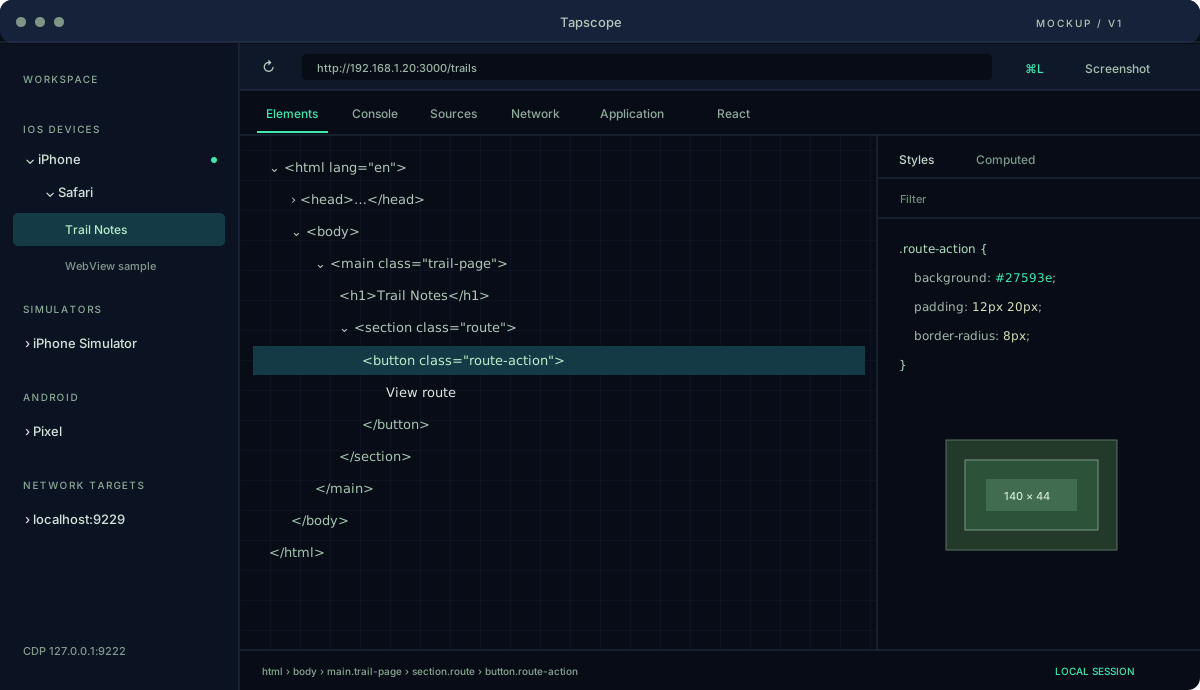
Explore the DOM and edit CSS on the connected page.
Read logs, inspect exceptions and evaluate JavaScript.
Trace requests, response bodies and WebSocket activity.
Pause JavaScript and inspect the call stack and variables.
Inspect cookies, local storage and IndexedDB.
Capture the page from the app or save evidence with the CLI.
Planned for v1: inspect components, props, state and hooks.
DEVICE SUPPORT
Planned v1 targets. Tapscope itself runs on macOS 15 or later.
| Target | Connection | Inspectable content |
|---|---|---|
| iPhone & iPad | USB | Safari, Chrome on iOS, inspectable WebViews |
| iOS over Wi-Fi | Network pairing | Paired devices with Web Inspector enabled |
| iOS Simulator | Xcode & simctl | Safari and WebViews in simulator apps |
| Android | USB & adb | Chrome and debugging-enabled WebViews |
| Network targets | CDP debug port | Chrome / Chromium, Node.js, Electron |
GET CONNECTED
Enable Web Inspector on iOS or USB debugging on Android, then connect to your Mac.
Select the device, app and page in Tapscope. Use the setup checks when a target is missing.
Open DevTools or connect your agent. After the change, reload and check the result on the device.
SETUP NOTES
A quick orientation. Full, searchable documentation follows in the documentation milestone.
Connect by USB, unlock the device and trust the Mac. Enable Settings → Safari → Advanced → Web Inspector. A WebView must be inspectable; App Store and TestFlight apps are not supported.
Enable developer options and USB debugging. Install adb on the Mac and accept the device’s authorization prompt. WebViews require debugging to be enabled by the app.
Install Xcode and its command line tools. Create and boot an iOS simulator, open Safari and select its page in Tapscope.
FLEXIBLE DEBUGGING TIME
Start with daily free sessions, choose a week for a focused project, or keep debugging all year.
For occasional checks
For a focused week
For your everyday workflow
Proposed launch prices · EUR, taxes included · Purchases will be handled by Polar.
FAQ
Version 1.0 is in development. These pages describe the planned v1 feature set; the download will be enabled when a signed release is ready.
The planned CLI works with agents that can run shell commands. Claude Code, Codex and Cursor can use JSON output; compatible MCP and CDP clients connect to the local endpoint.
The first release is for macOS 15 or later. Windows is planned for later; Linux is a future experimental option. Xcode is required for iOS simulators and adb for Android.
No. WebViews must be explicitly inspectable in developer-provisioned apps, for example with isInspectable on iOS 16.4+. App Store and TestFlight apps are outside the supported scope.
Device debugging and the CDP endpoint run locally on your Mac. License activation and validation use Polar. The optional website live chat connects to tawk.to only after you choose Start chat; IP address, browser data and messages are then processed by that service, which may use cookies.